Under the hood.
For the technically curious and the IT-minded: what Offsite runs, where your data goes, what it checks, and the questions people like you ask. The plain-language version is on the home page.
The model
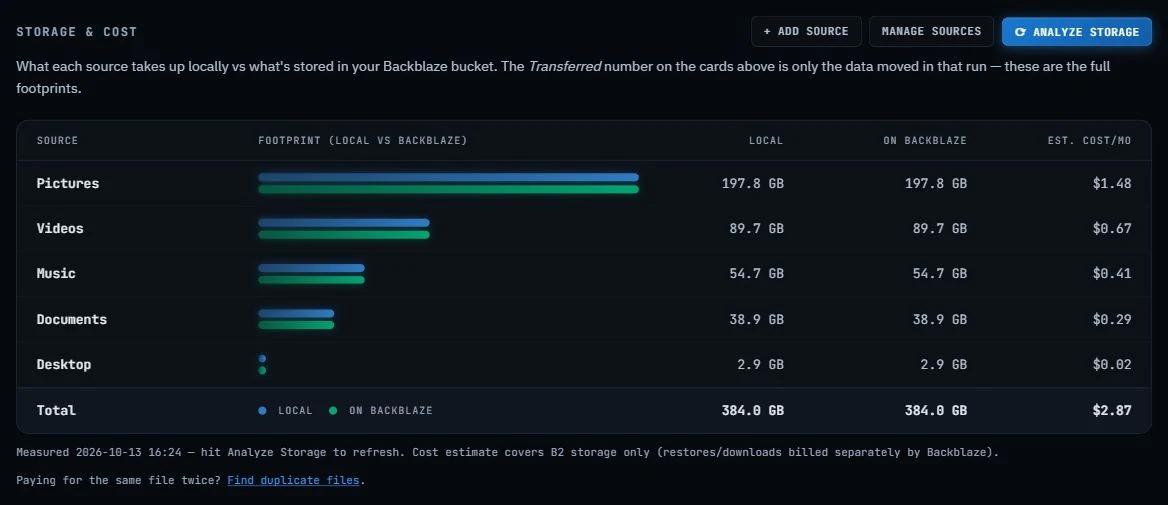
| Your storage | Offsite backs up to a Backblaze B2 bucket in your own account; the setup wizard walks you through an application key (never the master key) and creates the bucket. Storage is billed by Backblaze to you, $6.95/TB/month with the first 10 GB free. Amazon S3, Wasabi, Cloudflare R2 and other S3-compatible providers work too. |
|---|---|
| Plain files | No proprietary archive, no chunked repository, no lock-in. The bucket holds your folders as folders, readable from Backblaze's web console or any S3/B2 tool, with or without Offsite. |
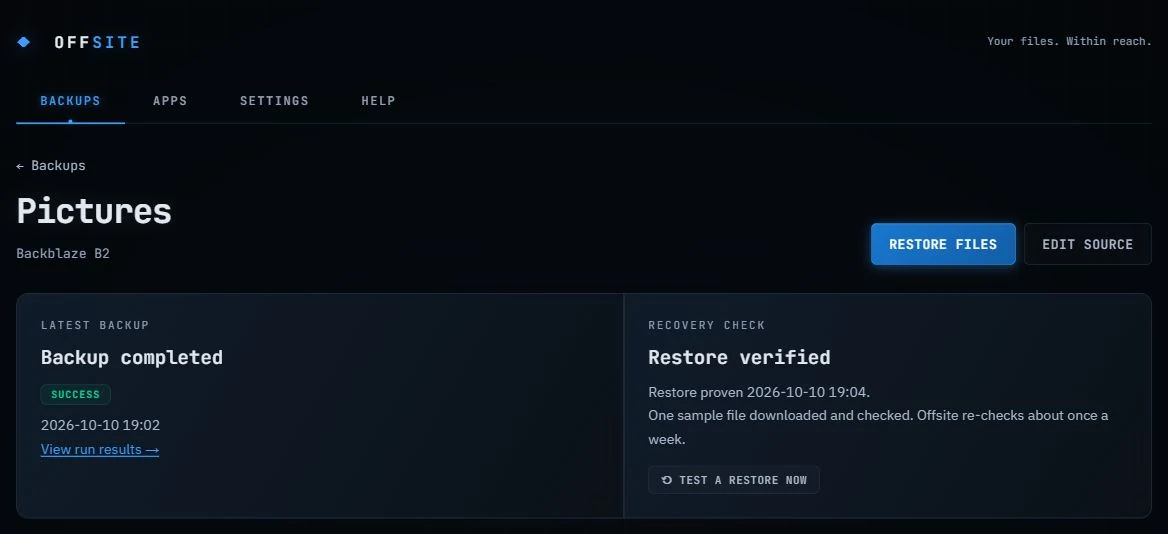
| Proof, not hope | A backup nobody has restored from is a hypothesis. Offsite's verify step pulls a random file per source back from the bucket and checks its SHA-1 against what Backblaze stored, then shows Restore proven with the date on the dashboard. |
Specification
| Engine | rclone, the battle-tested open-source sync tool, bundled and driven by Offsite, with retries, stall detection and junk excludes handled for you. |
|---|---|
| Sources | Any local folder, with per-source rules: keep-everything (copy) or mirror mode, exclude patterns, custom destinations. Cloud accounts (Google Drive, OneDrive including SharePoint, Dropbox, Box, pCloud) can be sources too, copied cloud-to-bucket. |
| Schedule | Weekly, per-source overrides, catch-up for missed runs, start-at-login tray mode. Optional bandwidth limit with quiet hours so backups never slow down your calls. |
| Restores | Browse the bucket level by level, restore any file or folder, flip a switch to see old versions of overwritten and deleted files. Restore-cost estimates shown before you download. Versions are kept on a retention window you set in plain language. |
| Verification | Every verify run pulls a random file per source back from storage and checks its SHA-1 fingerprint. The dashboard shows when a restore last actually worked. |
| Alerts | A failed, partial, or quietly stale backup messages you: Discord, Slack or Teams webhook, or email through your own provider. Sent straight from your machine; a test button proves it works before you need it. Optional weekly summary on Sunday evenings. |
| Files in use | Windows: files another program holds open (an Outlook .pst, a browser profile) are copied from a Volume Shadow Copy snapshot. One admin prompt installs a small signed helper and a scheduled task only your account can start; the snapshot is non-persistent and released right after. |
| Online-only files | OneDrive, iCloud and Dropbox placeholders are found before each run: downloaded to back them up when the drive has room, or left out with the reason when it doesn't. |
| iCloud Photos (beta) | The whole library, two ways. Direct: rclone's iCloud backend (iclouddrive, service = photos) streams it from iCloud to the bucket, nothing stored locally; Apple ID + the two-factor code, renewed about every 30 days (the app warns first). Through Apple's app: the folder iCloud for Windows or Photos on a Mac fills, with online-only items brought down first when there's room. Copy mode either way, so photos deleted from the phone stay in the backup. A per-source check lists iCloud against the bucket (name and size; same-name collisions flagged) before you free up the iPhone. |
| New computer | After backups, the list of installed apps (winget on Windows, Homebrew on Mac), the printers (name, model, address) and the taskbar/Dock pins go to your bucket; on the next computer, missing apps reinstall in one click and the printers and pins are a checklist. Hidden Essentials adds the small folders sync misses: game saves, SSH and Git config, fonts, Outlook archives. |
| Extras | Copy to a USB drive (by hand, or automatically when it's plugged in), a copies count per folder (the 3-2-1 rule), duplicate-file reports, GitHub account mirroring (private repos included, tokens in the OS credential store), one-click signed updates, and an in-app Help page that explains every status. |
| Platforms | Windows 10/11 (code-signed) and macOS 13+ (Apple Silicon and Intel; signed and notarized by Apple). Linux later. |
Screens
What we don't do
Subscription
Offsite has zero recurring cost per user: backups run on your computer, storage is your own account. Charging you monthly for that would be a tax on forgetting to cancel.
Servers of ours in the middle
Your files travel from your computer to your bucket. They never pass through, or rest on, anything we run.
Proprietary formats
Some backup tools store your data in chunked, encrypted repositories only they can read. Offsite stores folders as folders, readable with or without us.
Telemetry
The app phones home for exactly one thing: checking its own public releases page for updates. Your file names, sizes and habits stay on your machine.
The full FAQ
How is this different from Backblaze's own Personal Backup?
Personal Backup is $99 a year per computer for unlimited data, kept in Backblaze's service. Offsite is $10 once for up to three computers, with your files as plain folders in a B2 bucket you own, billed at $6.95/TB/month. Under about 1.2 TB per computer Offsite costs less; above that, Personal Backup does. The full, honest comparison.
Is my data private? Where are the keys?
Your files go straight from your computer to your bucket over TLS, with no servers of ours in between and no telemetry. Storage access keys are kept by rclone in its own config on your machine; GitHub tokens and similar live in your operating system's credential store. Offsite's own database holds metadata only, never secrets.
Is the backup encrypted?
In transit, yes (TLS). At rest, B2 offers server-side encryption as a bucket setting, but Offsite doesn't add its own client-side encryption: that's the price of plain files you can open anywhere. If you need client-side encryption, a tool built on encrypted repositories is the better fit.
Can I read my backup without Offsite?
Yes. Each folder is stored as a folder: browse and download it from Backblaze's web console, mount or copy it with rclone, or use any B2/S3 client. Old versions are B2 file versions, visible in the console too.
Windows shows a SmartScreen prompt when I install. Why?
The installer is code-signed through Microsoft's Trusted Signing, so the prompt should name the publisher, Elias Gomez, instead of "Unknown publisher". Windows can still pause on a brand-new release while it builds a reputation for that signature; if it does, check that the publisher line says Elias Gomez, then click "More info" → "Run anyway". If it says "Unknown publisher", you are not holding our file: download again from the home page. Every download is built in public CI from the source.
It's free to download but costs $10. Which is it?
Both, during the beta. Anyone can download and use Offsite today with no key and no nag. The $10 buys a personal license for up to 3 of your own computers, forever. We're not enforcing it yet; when license keys go live, everyone who bought during the beta gets a key by email and keeps going.
Does it run on Linux?
Not yet. Windows and macOS come first; Linux is planned after the Mac version has settled.
Something went wrong. Where do I report it?
Open an issue (the app's Help page pre-fills your version and OS), or email the address in the footer.